I lost north of $100,000 last Wednesday. It evaporated over a 24-hour time span in a “SIM port attack” that drained my Coinbase account. It has been four days since the incident and I’m gutted. I have zero appetite; my sleep is restless; I am awash in feelings of anxiety, remorse, and embarrassment.
This was the single most expensive lesson of my life and I want to share my experience + lessons learned with as many people as possible. My goal is to increase awareness about these types of attacks and to motivateyouto increase the security of your online identity.
This is still very raw (I haven’t even told my family yet); please reserve judgement with regards to the naive security practices laid out in this post.
Details Of The Attack
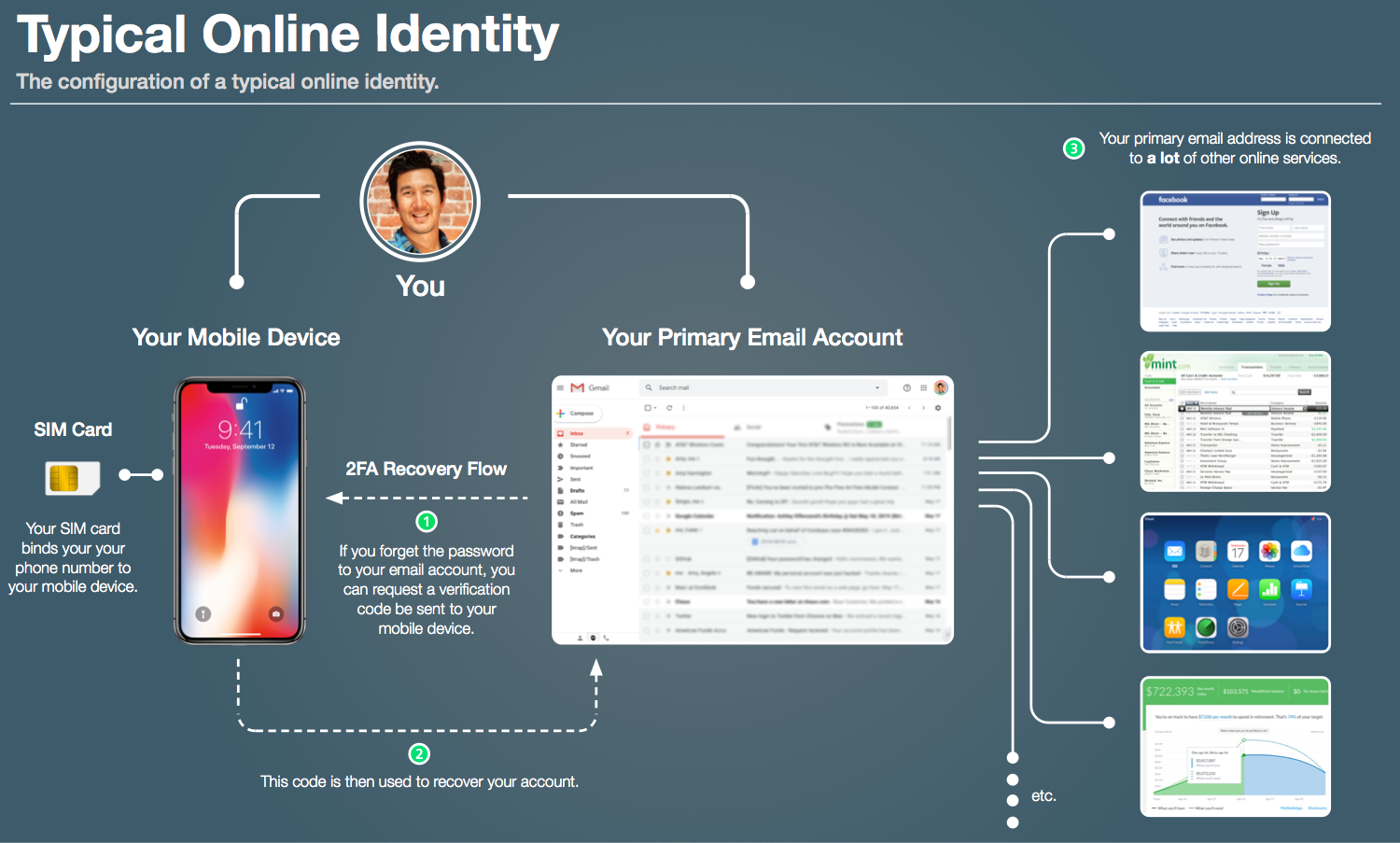
You might be asking yourself, what exactly is a “SIM port attack”? In order to describe the attack, let’s examine a typical online identity. The diagram below should look familiar to most people.
Most of us have a primary email account that is connected to A LOT of other online accounts. Most of us also have a mobile device that can be used to recover your email password should you ever forget it.
Authorized SIM Porting
The ability to port your SIM card to another device is a service that mobile carriers provide to their customers. It allows a customer to request their phone number be transferred to a new device. In most cases, this is a perfectly legitimate request; this happens when we upgrade to a new phone, switch mobile carries, etc.
A SIM Port Attack
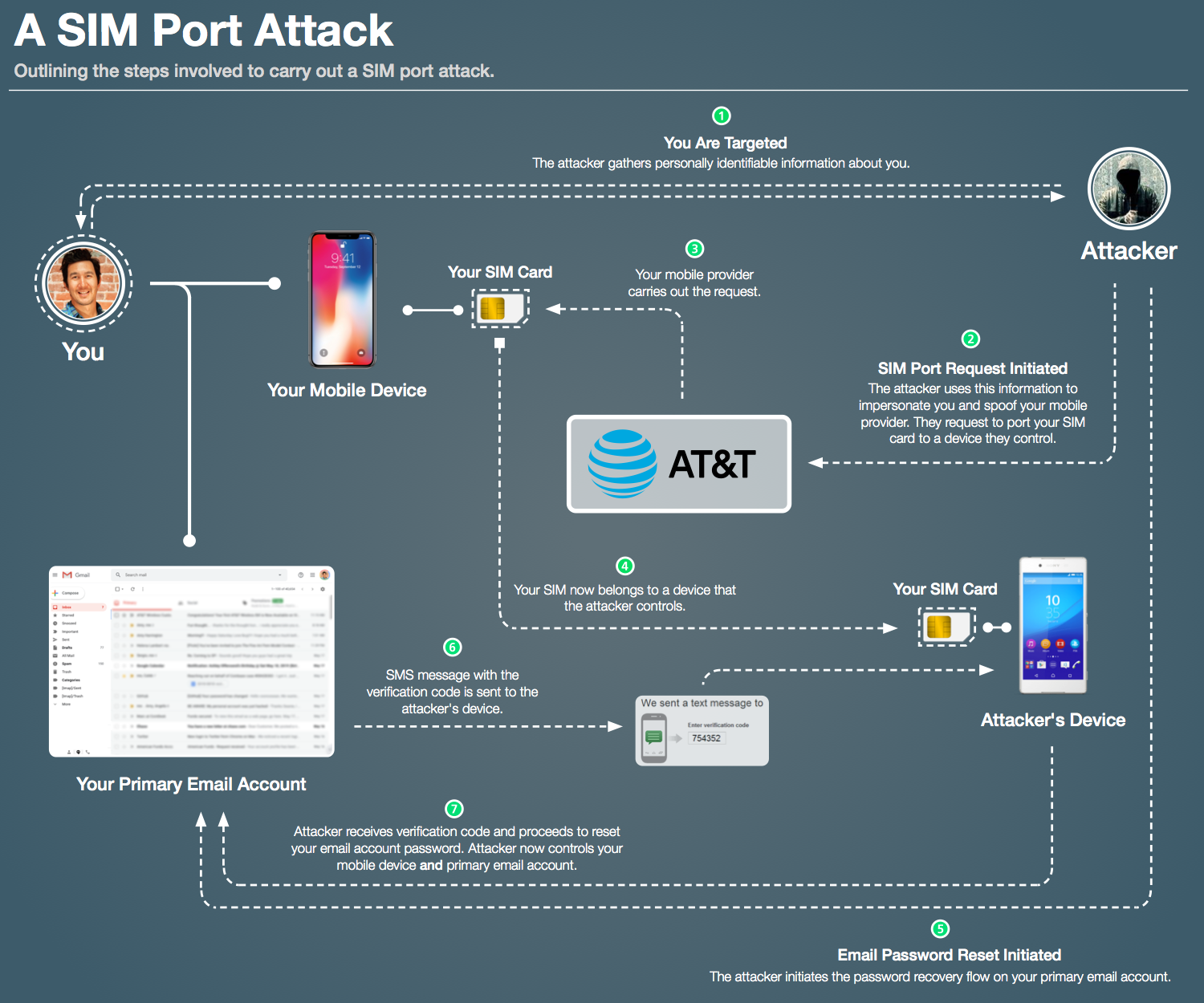
A “SIM port attack”, however, is a malicious port performed by an unauthorized source — the attacker. The attacker portsyourSIM card to a phone thattheycontrol. The attacker then initiates the password reset flow on your email account. A verification code is sent from your email provider to your phone number — which is intercepted by the attacker, as they now control your SIM card. The diagram below outlines the attack step by step.
Once the attacker controls your primary email account, they begin to move laterally across any lucrative online services that you manage via that email address (bank accounts, social media accounts, etc.). If they’re terribly malicious, they can even lockyouout of your own accounts with little recourse to reclaim them.
Take a moment to consider the sheer volume of sensitive information tied to a single Google Account:
Your address, date of birth, and other private, personally identifiable information
Access to potentially compromising photos of you (and/or your partner)
Access to your calendar and upcoming travel dates
Access to your private emails, documents, and search history
Access to your personal contacts andtheirprivate information as well as relation to you
Access to all other online services for which your primary email address was used as the authentication source
Timeline of Events
With a better grasp on how such an attack is carried out and the scope of what’s at stake, let’s dive into the timeline ofthisspecific attack. I want to paint a picture of how the attack was executed, how I experienced these events, and whatyoucan do differently to protect yourself should you experience similar symptoms.
The timeline is broken out into four sections:
What I experienced:The events as experienced from my point of view — if you encounter something similar, these are clear indicators that you are likely under attack.
What the attacker was doing:The underlying tactics that the hacker used to work their way into my Coinbase account.
My perceived threat level:The threat level I attributed to these events as they were happening.
The threat level I should have had:In hindsight, the threat level I wish I would have had as these events unfolded.
Lessons Learned + Recommendations
This was the single most expensive lesson of my life. I lost a meaningful percentage of net worth in a 24 hour period; irreversibly. Below are a few pieces of advice I would encourage others use to better protect themselves:
Use A Hardware Wallet To Secure Your Crypto: Move your crypto to a hardware wallet/offline storage/multi-sig wallet whenever you are nottransacting. Do not leave funds idle on exchanges or fiat on-ramps. I treated Coinbase like a bank account and you have absolutely zero recourse in the case of an attack. I knew the risks better than most, but never thought something like this could happen to me. I intensely regret not taking stronger security measures with my crypto.
SMS Based 2FA Is Not Enough: Regardless of the assets and/or identities you are trying to protect online, upgrade to hardware based security (ie: something physical that an attacker would have to physically obtain in order to perform an attack). While Google Authenticator and Authy can turn your mobile device into a piece of hardware based security, I would advise going a step further. Pick up a YubiKey that you physically control and cannot be spoofed.
Reduce Your Online Footprint: Reduce the urge to needlessly share personally identifiable information (birthdate, location, pictures with geolocation data embedded in them, etc.) online. All of that quasi publicly available data can be turned against you in the event of an attack.
Google Voice 2FA: In some cases, an online service will not support hardware-based 2FA (they rely on weaker SMS based 2FA). In these cases, you might be better off creating a Google Voice phone number (which cannot be SIM ported) and using that has your 2-Factor Auth recovery number.
Create a Secondary Email Address: Instead of binding everything to a single email address, create a secondary address for your critical online identities (bank accounts, social media accounts, crypto exchanges, etc.). Do not use this email address for anything else and keep it private. Back up that address with some form of hardware-based 2FA.
Given my naive security practices, I probably deserved to get hacked — I get it. It doesn’t make it hurt any less and passing judgement dilutes the thrust of this story, which is:
To let others know how easy it is to be victimized
To use that knowledge and the recommendations above to prioritize the security of your online identity
I can’t stop thinking about the small, easy things I could have done to protect myself along the way. My thoughts are clouded with what-ifs and alternate timelines.
However, those thoughts are juxtaposed with two overriding feelings — laziness and survival bias. I never took my online security that serious because I had never experienced an attack. And while I understood my risk profile, I was simply too lazy to secure my assets with the rigor they deserved.
 I lost north of $100,000 last Wednesday. It evaporated over a 24-hour time span in a “SIM port attack” that drained my Coinbase account. It has been four days since the incident and I’m gutted. I have zero appetite; my sleep is restless; I am awash in feelings of anxiety, remorse, and embarrassment.
This was the single most expensive lesson of my life and I want to share my experience + lessons learned with as many people as possible. My goal is to increase awareness about these types of attacks and to motivate you to increase the security of your online identity.
This is still very raw (I haven’t even told my family yet); please reserve judgement with regards to the naive security practices laid out in this post.


没有评论:
发表评论